Access via Edit > Project Settings > Plugins > IVSmoke
These settings apply globally to all smoke volumes in your project. Settings are saved to DefaultGame.ini.
Note: Settings may be reorganized into sub-sections in future updates. The functionality remains the same.
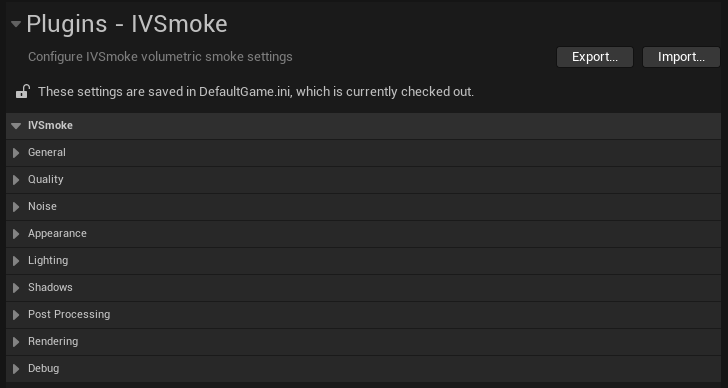
General
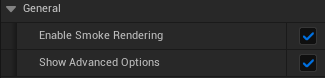
| Setting | Type | Default | Description |
|---|---|---|---|
| Enable Smoke Rendering | bool | true | Master toggle for the entire IVSmoke rendering system. Disable to turn off all smoke rendering without removing volumes. |
| Show Advanced Options | bool | false | Reveals additional advanced settings in Appearance, Lighting, and Shadows sections. Enable when fine-tuning specific behaviors. |
Usage Tips:
- Use Enable Smoke Rendering as a global kill switch for performance testing
- Enable Show Advanced Options only when you need precise control over edge fade, light override, or shadow bias
Quality
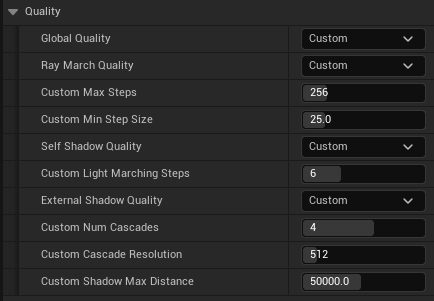
The Quality section provides a tiered system for balancing visual quality against performance.
| Setting | Type | Default | Description |
|---|---|---|---|
| Global Quality | Enum | Medium (Balanced) | Master quality preset that controls Ray Marching, Self-Shadow, and External Shadow quality together. |
Global Quality Presets
| Preset | Ray March Steps | Min Step Size | Self-Shadow | External Shadow | Use Case |
|---|---|---|---|---|---|
| Low | 128 | 50.0 cm | 3 steps | Off | Mobile/Low-end PC, Maximum performance |
| Medium | 256 | 25.0 cm | 6 steps | On (512px) | Recommended for most projects |
| High | 512 | 16.0 cm | 8 steps | On (1024px) | High-end PC, Maximum quality |
| Custom | Per-section | Per-section | Per-section | Per-section | Independent control per section |
Custom Quality Mode
When Global Quality is set to Custom, you can configure each quality section independently. Each section (Ray March, Self-Shadow, External Shadow) has its own quality preset selector.
Ray March Quality
| Setting | Type | Default | Description |
|---|---|---|---|
| Ray March Quality | Enum | Medium | Controls ray marching precision. Can be set to Low/Medium/High/Custom. |
When Ray March Quality is Custom:
| Setting | Type | Range | Default | Description |
|---|---|---|---|---|
| Custom Max Steps | int32 | 32-1024 | 256 | Maximum ray marching iterations per pixel |
| Custom Min Step Size | float | 5.0-100.0 | 25.0 | Minimum distance (cm) between ray samples |
Self-Shadow Quality
| Setting | Type | Default | Description |
|---|---|---|---|
| Self-Shadow Quality | Enum | Medium | Controls internal smoke shadowing. Can be set to Off/Low/Medium/High/Custom. |
When Self-Shadow Quality is Custom:
| Setting | Type | Range | Default | Description |
|---|---|---|---|---|
| Custom Light Marching Steps | int32 | 1-16 | 6 | Steps for light direction sampling |
External Shadow Quality
| Setting | Type | Default | Description |
|---|---|---|---|
| External Shadow Quality | Enum | Medium | Controls Cascaded Shadow Map quality. Can be set to Off/Low/Medium/High/Custom. |
When External Shadow Quality is Custom:
| Setting | Type | Range | Default | Description |
|---|---|---|---|---|
| Custom Num Cascades | int32 | 1-6 | 4 | Number of shadow cascade levels |
| Custom Cascade Resolution | int32 | 256-2048 | 512 | Shadow map texture resolution |
| Custom Shadow Max Distance | float | 1000-100000 | 50000 | Maximum shadow rendering distance (cm) |
Performance Impact
- Max Steps: Higher values increase GPU cost linearly
- Min Step Size: Smaller values improve quality but require more steps
- Cascade Resolution: Memory usage scales quadratically (512x512 = 1MB, 1024x1024 = 4MB per cascade)
Appearance
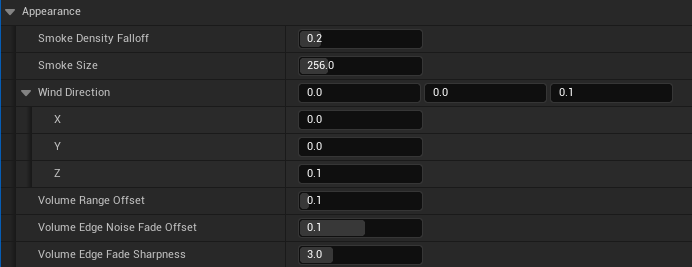
Controls the visual characteristics of the smoke.
| Setting | Type | Range | Default | Description |
|---|---|---|---|---|
| Smoke Density Falloff | float | 0.0-1.0 | 0.2 | Edge softness. Lower values create softer, more gradual edges. Higher values create sharper, more defined boundaries. |
| Smoke Size | float | 1.0-1000.0 | 128.0 | Scale of the noise sampling. Larger values create bigger, more billowy smoke patterns. |
| Wind Direction | FVector | - | (0, 0, 0.1) | Direction and speed of wind animation. The magnitude affects speed. |
Advanced Options (Show Advanced Options = true)
| Setting | Type | Range | Default | Description |
|---|---|---|---|---|
| Volume Range Offset | float | 0.0-1.0 | 0.1 | Offset for volume boundary calculation. Adjusts where smoke starts to appear. |
| Volume Edge Noise Fade Offset | float | -1.0 to 1.0 | 0.1 | Noise-based fade at volume edges. |
| Volume Edge Fade Sharpness | float | 0.1-10.0 | 3.0 | Sharpness of the edge fade transition. Higher = more abrupt cutoff. |
Visual Guide:
Lighting
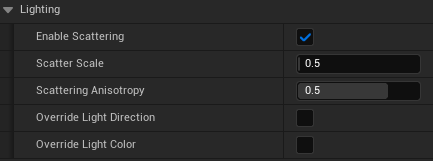
Controls how the smoke interacts with scene lighting.
| Setting | Type | Range | Default | Description |
|---|---|---|---|---|
| Enable Scattering | bool | - | true | Enables Rayleigh/Mie scattering simulation for realistic light behavior through smoke. |
| Scatter Scale | float | 0.0-10.0 | 0.5 | Intensity of the scattering effect. Higher values make smoke appear brighter when lit. |
| Scattering Anisotropy | float | -0.99 to 0.99 | 0.5 | Henyey-Greenstein phase function parameter. Controls light scattering direction. |
Scattering Anisotropy Explained:
Advanced Options (Show Advanced Options = true)
| Setting | Type | Default | Description |
|---|---|---|---|
| Override Light Direction | bool | false | Use custom light direction instead of Directional Light. |
| Light Direction Override | FVector | (0, 0, 1) | Custom light direction when override is enabled. |
| Override Light Color | bool | false | Use custom light color instead of Directional Light color. |
| Light Color Override | FLinearColor | White | Custom light color when override is enabled. |
Shadows
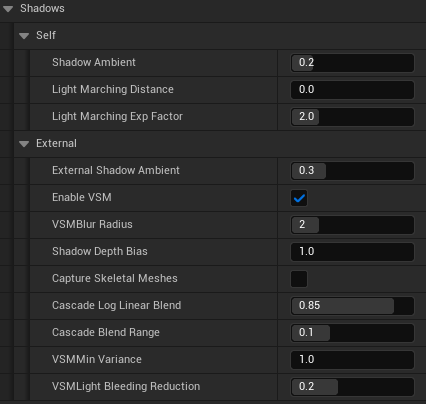
The Shadows section is divided into Self (internal smoke shadows) and External (shadows from scene objects).
Self Shadows
Self-shadowing creates depth within the smoke by calculating how much light is blocked as it travels through the volume.
| Setting | Type | Range | Default | Description |
|---|---|---|---|---|
| Shadow Ambient | float | 0.0-1.0 | 0.2 | Minimum brightness in shadowed areas. 0 = pitch black shadows, 1 = no shadows. |
| Light Marching Distance | float | 0.0-500.0 | 0.0 | Maximum distance (cm) to trace toward light. 0 = Automatic (traces until exiting volume). |
| Light Marching Exp Factor | float | 1.0-5.0 | 2.0 | Exponential distribution for light samples. Higher values concentrate samples near the surface. |
External Shadows
External shadows allow smoke to receive shadows from scene geometry using Cascaded Shadow Maps (CSM).
| Setting | Type | Range | Default | Description |
|---|---|---|---|---|
| External Shadow Ambient | float | 0.0-1.0 | 0.3 | Minimum brightness in externally shadowed areas. |
| Enable VSM | bool | - | true | Use Variance Shadow Maps for softer shadow edges. |
| VSM Blur Radius | int32 | 0-8 | 2 | Blur radius for VSM. Higher = softer shadows. |
| Shadow Depth Bias | float | 0.0-100.0 | 1.0 | Bias to prevent shadow acne artifacts. |
| Capture Skeletal Meshes | bool | - | false | Include animated characters in shadow casting. Increases cost. |
| Cascade Log Linear Blend | float | 0.0-1.0 | 0.85 | Blend between logarithmic and linear cascade distribution. |
| Cascade Blend Range | float | 0.0-0.3 | 0.1 | Soft transition range between cascade levels. |
| VSM Min Variance | float | 0.01-100.0 | 1.0 | Minimum variance threshold to prevent light bleeding in thin shadows. |
| VSM Light Bleeding Reduction | float | 0.0-0.5 | 0.2 | Reduces light bleeding artifacts at shadow edges. |
Post Processing
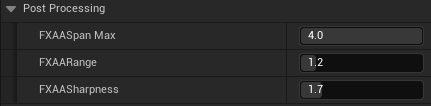
Controls the FXAA anti-aliasing applied specifically to smoke edges.
| Setting | Type | Range | Default | Description |
|---|---|---|---|---|
| FXAA Span Max | float | 0.0-4.0 | 4.0 | Maximum edge search distance. Higher values smooth longer edges. |
| FXAA Range | float | 0.0-8.0 | 1.2 | Edge detection threshold. Lower = more aggressive smoothing. |
| FXAA Sharpness | float | 0.1-8.0 | 1.7 | Sharpening applied during FXAA. Counteracts blur from anti-aliasing. |
Rendering
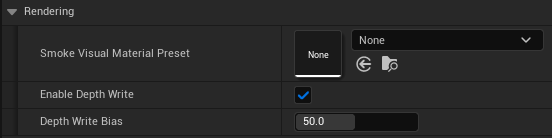
Controls the render pipeline integration.
| Setting | Type | Default | Description |
|---|---|---|---|
| Smoke Visual Material | Soft Object Path | None | Optional material for custom smoke visuals. |
Advanced Options (Show Advanced Options = true)
| Setting | Type | Range | Default | Description |
|---|---|---|---|---|
| Enable Depth Write | bool | - | true | Write smoke depth to scene depth buffer for correct translucent sorting. When enabled, particles behind opaque smoke regions are correctly occluded. |
| Depth Write Bias | float | 0.0-100.0 | 50.0 | Depth bias in centimeters. Positive values push depth further from camera. Helps prevent z-fighting artifacts. |
Depth Write System
IVSmoke uses a pre-pass depth write system for correct translucent object sorting:
- Ray March Pass - Reads opaque scene depth (before smoke modifies it)
- Upscaling & Filtering - Prepares smoke data at full resolution
- Depth Write Pass - Writes smoke depth to scene depth buffer
Key characteristics:
- Only writes depth for nearly opaque pixels (Alpha >= 0.99)
- Executes in pre-pass pipeline before engine's translucent pass
- Particles and other translucents are automatically sorted correctly behind opaque smoke regions
When to adjust Depth Write Bias:
- Increase if you see z-fighting (flickering) at smoke edges
- Decrease if particles appear to "pop through" smoke too early
- Default value of 50 cm works well for most use cases
Debug

| Setting | Type | Default | Description |
|---|---|---|---|
| Show Debug Volumes | bool | false | Displays wireframe bounds for all smoke volumes in the viewport. |
Smoke Preset
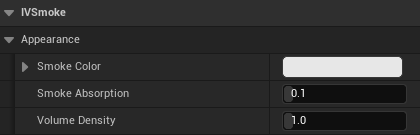
Smoke Presets are Data Assets that define per-volume appearance settings. Use presets to create reusable smoke configurations (white smoke, colored smoke, thick/thin smoke, etc.).
Creating a Smoke Preset
- In Content Browser, right-click
- Select Miscellaneous > Data Asset
- Choose
IVSmokeSmokePresetas the class - Name it descriptively (e.g.,
DA_SmokePreset_WhiteThick)
Preset Properties
| Property | Type | Range | Default | Description |
|---|---|---|---|---|
| Smoke Color | FLinearColor | - | (0.8, 0.8, 0.8, 1.0) | RGB color of the smoke. Alpha is ignored. |
| Smoke Absorption | float | 0.0-1.0 | 0.1 | Light absorption coefficient. Higher values create denser, more opaque smoke. |
| Volume Density | float | 0.0-10.0 | 1.0 | Overall density multiplier for this volume. |
Applying a Preset
- Select your
AIVSmokeVoxelVolumeactor in the level - In the Details panel, find IVSmoke | Config > Smoke Preset Override
- Assign your Smoke Preset data asset
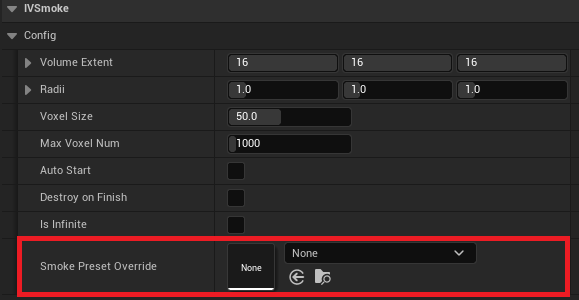
Preset Examples
| Preset Name | Color | Absorption | Density | Use Case |
|---|---|---|---|---|
| White Smoke | (0.9, 0.9, 0.9) | 0.1 | 1.0 | Standard smoke grenade |
| Thick Black | (0.1, 0.1, 0.1) | 0.3 | 2.0 | Heavy industrial smoke |
| Red Signal | (0.8, 0.2, 0.1) | 0.15 | 1.2 | Signal/marker smoke |
| Thin Mist | (0.7, 0.7, 0.8) | 0.05 | 0.5 | Light fog/mist effect |
Translucent Sorting
When smoke needs to correctly sort with translucent objects (like fire effects or glass), IVSmoke uses a Depth Write system.
How It Works
IVSmoke writes smoke depth to the standard scene depth buffer during a pre-pass, before Unreal's translucent pass executes. This allows translucent particles (Niagara/Cascade) and other translucent objects to correctly depth-test against smoke.
Automatic Sorting
Unlike previous versions that required Custom Depth configuration, the current Depth Write system works automatically:
- No additional setup required for translucent sorting
- Particles behind opaque smoke regions are correctly occluded
- Only nearly opaque smoke pixels (Alpha >= 0.99) write depth
Troubleshooting
| Issue | Solution |
|---|---|
| Particles appear in front of smoke | Ensure Enable Depth Write is true (default) |
| Z-fighting at smoke edges | Increase Depth Write Bias value |
| Particles pop through too early | Decrease Depth Write Bias value |
Performance
The Depth Write system has minimal performance overhead as it runs as part of the pre-pass pipeline and only writes depth for opaque smoke regions.
Editor Preview
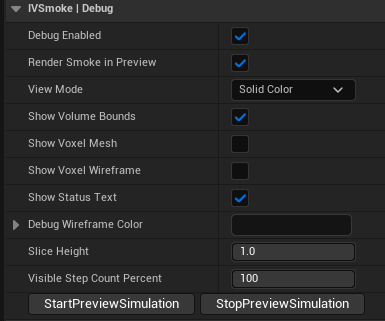
The Editor Preview feature allows you to preview smoke simulation directly in the editor viewport without entering Play mode.
Starting Preview
- Select an
AIVSmokeVoxelVolumeactor in your level - In the Details panel, find IVSmoke | Debug
- Ensure Debug Enabled is checked
- Click Start Preview Simulation
The smoke will begin simulating through its lifecycle phases (Expansion → Sustain → Dissipation) directly in the editor viewport.
Stopping Preview
Click Stop Preview Simulation to immediately halt the simulation and clear all voxel data.
Debug Visualization Options
| Setting | Type | Default | Description |
|---|---|---|---|
| Debug Enabled | bool | true | Master toggle for all debug features. |
| Render Smoke In Preview | bool | true | Whether to render the actual smoke visual during preview. |
| View Mode | Enum | Solid Color | Visualization mode: Solid Color or Heatmap (density-based). |
| Show Volume Bounds | bool | true | Display the bounding box of the smoke volume. |
| Show Voxel Mesh | bool | false | Render each active voxel as a cube mesh. Heavy - use sparingly. |
| Show Voxel Wireframe | bool | true | Draw wireframe cubes for active voxels. Lighter than mesh. |
| Show Status Text | bool | true | Display state, voxel count, and simulation time as floating text. |
| Debug Wireframe Color | FColor | Dark Gray | Color for debug wireframes. |
| Slice Height | float | 1.0 | Display only voxels below this height (0-1 normalized). Useful for inspecting internal structure. |
| Visible Step Count Percent | int32 | 100 | Percentage of simulation steps to visualize. |
Preview Workflow Tips
- Rapid Iteration: Adjust Volume parameters, click Start Preview, observe results, stop, adjust, repeat
- Use Wireframe Mode: Enable
Show Voxel Wireframeto see the simulation structure without heavy mesh rendering - Status Monitoring: Keep
Show Status Textenabled to track voxel count and current simulation phase
Limitations
- Editor Preview does not trigger network replication
- Holes created during preview are local only
- Performance in preview may differ from packaged builds
Stat IVSmoke
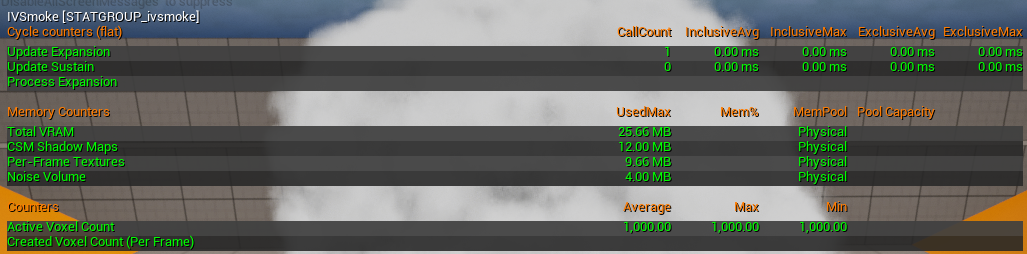
IVSmoke provides detailed statistics for performance profiling and VRAM monitoring.
Enabling Stats
Open the console (~ key) and type:
Available Statistics
Memory Stats (GPU VRAM)
| Stat Name | Description |
|---|---|
| Noise Volume | Memory used by the 3D noise texture. Static after generation. |
| CSM Shadow Maps | Memory used by Cascaded Shadow Maps. Scales with resolution and cascade count. |
| Per-Frame Textures | Temporary textures allocated each frame (voxel atlas, occupancy, etc.). |
| Total VRAM | Sum of all IVSmoke GPU memory usage. |
Cycle Stats (CPU/GPU Time)
| Stat Name | Description |
|---|---|
| Update Expansion | Time spent in the expansion phase (voxel creation). |
| Update Sustain | Time spent in the sustain phase (maintenance). |
| Update Dissipation | Time spent in the dissipation phase (voxel removal). |
| Process Expansion | Actual voxel creation logic execution time. |
| Prepare Dissipation | Setup time for dissipation phase. |
| Process Dissipation | Actual voxel removal logic execution time. |
Counter Stats
| Stat Name | Description |
|---|---|
| Active Voxel Count | Current number of active voxels across all volumes. |
| Created Voxel Count (Per Frame) | Voxels created this frame. |
| Destroyed Voxel Count (Per Frame) | Voxels removed this frame. |
Using with Unreal Insights
For deeper analysis, use Unreal Insights profiler:
- Launch with
trace=default,ivsmoke - Open Tools > Unreal Insights
- Filter by "IVSmoke" to see detailed timing breakdown
Best Practices
Recommended Level Placement
When placing smoke volumes in your level, consider these guidelines:
Spacing and Distribution
- Avoid clustering: Do not spawn many smoke volumes in the same location simultaneously. Overlapping volumes in the same area can cause rendering artifacts and significant performance drops.
- Stagger activation: If multiple smoke grenades land near each other, consider staggering their activation times slightly.
- Use adequate spacing: Maintain reasonable distance between simultaneously active smoke volumes.
Volume Sizing
- Match gameplay needs: Size your smoke volumes to cover the intended area without excessive overlap.
- Consider sightlines: Place smoke to block key sightlines rather than covering entire areas.
Performance Tips
- Limit simultaneous volumes: Keep the number of simultaneously active smoke volumes reasonable for your target hardware.
- Use appropriate quality settings: Match quality settings to your target platform.
- Test with worst-case scenarios: Test performance with the maximum expected number of simultaneous smoke volumes.
Copyright (c) 2026, Team SDB. All rights reserved.